
Master Your Purchase Cycle with Tally: Streamline Procurement from Order to Payment
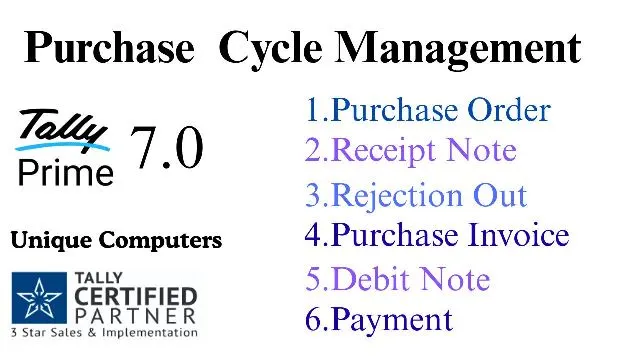
Do you feel overwhelmed tracking orders, receipts, and supplier payments? Consequently, a haphazard purchase process bleeds profits and creates inventory chaos. Therefore, mastering the Purchase Cycle with Tally is your ultimate solution. Indeed, TallyPrime transforms complex procurement into a seamless, automated workflow. Ultimately, this guide unveils every step—from raising a Purchase Order to closing the ledger. Remarkably, you gain crystal-clear control over stock and dues at every stage. For businesses in Roorkee, Unique Computers stands as the premier partner. Purchase TallyPrime from us and receive Free Installation & Training plus dedicated One-Year Support. Now, let’s automate your business.
Why Mastering the Purchase Cycle with Tally is a Game-Changer
Firstly, a disciplined Purchase Cycle with Tally eradicates errors and boosts efficiency. Imagine instantly matching invoices, tracking rejections, and knowing exact stock levels. Subsequently, financial accuracy improves and supplier relationships strengthen. Hence, automation isn’t a luxury; it’s essential for modern business survival. Particularly, TallyPrime makes this transition effortless and foolproof.
The Complete Step-by-Step Purchase Cycle with Tally
1. Start with a Purchase Order (PO): The Foundation of Your Procurement
Initially, every procurement saga begins with a Purchase Order. Think of it as a formal, binding request sent to your supplier. So, how does this work in your Purchase Cycle with Tally? Simply create a Purchase Order voucher in TallyPrime. Importantly, this document lists items, quantities, rates, and terms. Consequently, you set clear expectations. Meanwhile, your committed stock increases, giving a realistic view of future inventory.
2. Receive Goods: Book a Receipt Note or GRN
After the supplier dispatches goods, the next phase kicks in. Upon delivery, you must book a Receipt Note or Goods Receipt Note (GRN). This critical step in the Purchase Cycle with Tally records what physically arrived. However, check items against your PO. If everything matches, the GRN updates your stock-in-hand. Thus, you can continue sales without delay. Pro Tip: Always book the GRN before the supplier’s invoice arrives for accurate accrual accounting.
3. Handle Rejections: The Rejection Out Voucher
But what if some items are damaged or sub-standard? This common hiccup needn’t cause panic. Here, if any rejection occurs, than book a voucher in Rejection Out. Specifically, this Tally voucher removes defective goods from your stock. Furthermore, it creates a record to return items to the supplier or claim credit. Therefore, your main stock value remains accurate and uncontaminated.
4. Bill Against the Invoice: Create a Purchase Invoice
Following this, you will get invoice from your party. Now, it’s time for bill processing. Next, create a Purchase Invoice in Tally. Crucially, you can bill against the earlier GRN. Tally automatically fetches details, slashing data entry work. This action records your formal liability and updates input tax credits. So, your books now mirror the true financial debt to the supplier.
5. Resolve Issues: Generate a Debit Note
Occasionally, discrepancies persist post-invoicing. Rates might differ, or rejection values may need adjustment. In such cases, if any issue now than create a Debit Note. This powerful instrument in your Purchase Cycle with Tally formally reduces your payable amount. It amends the original invoice value, ensuring your books reflect the fair payable sum.
6. Final Settlement: Make Payment and Close the Entry
Finally, after all these steps, payment to the supplier settles the cycle. In Tally, use the Payment voucher to clear the outstanding purchase invoice. Once paid, the supplier ledger updates, marking this cycle complete. Ultimately, you close this entry with precision, leaving a clean audit trail.
Powerful Reporting: Gaze Into Your Business Health
Amazingly, you can check all stock summary at every level. Track item-wise movement from PO to sale. Additionally, you can check party ledger from Ledger option. Monitor dues, payment history, and credit periods effortlessly. Hence, Tally isn’t just a recording tool; it’s your business intelligence hub.
Why Choose Unique Computers Roorkee for Your Tally Journey?
For a flawless Purchase Cycle with Tally, you need expert guidance. Unique Computers is Tally No.1 Partner in Roorkee. Our authority is unmatched.
Our Exclusive Offer for You:
- One Year Comprehensive Support: We resolve your queries promptly. Cost: ₹3,600 + GST.
- Free One-Time Training & Installation: We ensure your team is confident from day one. *(Usually, One Time Training Cost is ₹5,000 + GST, but it’s FREE with purchase!)*
So, hurry and purchase TallyPrime and make your business automate function. Don’t let manual processes hold you back. Embrace automation, enhance accuracy, and accelerate growth.
Ready to transform your procurement? Contact us today!
Email: muneshrke@gmail.com | Website: https://hardwaresoftware.in
FAQ: Purchase Cycle with Tally
Q1: What is the main benefit of managing the Purchase Cycle with Tally?
A: It provides end-to-end automation from order to payment, ensuring real-time stock and ledger accuracy, reducing errors, and saving time.
Q2: Can I track stock after creating just a Purchase Order in Tally?
A: Yes! A PO shows “committed stock,” helping you plan sales and inventory even before goods arrive.
Q3: What’s the difference between a GRN and a Purchase Invoice in Tally?
A: A GRN records physical stock receipt, while a Purchase Invoice records the financial liability from the supplier’s bill. You can book a GRN first for better accrual tracking.
Q4: Why is a ‘Rejection Out’ voucher important?
A: It maintains stock accuracy by removing defective goods and creates a record for returning items or claiming credit from the supplier.
Q5: When should I use a Debit Note in Tally?
A: Use it after invoicing if there’s a rate dispute, quality issue, or return, to formally reduce the amount payable to the supplier.
Q6: How do I check if a particular purchase cycle is complete?
A: Check the supplier’s ledger. If the invoice amount is nil after payment, the cycle is closed. You can also trace the transaction from the stock summary.
Q7: What makes Unique Computers Roorkee the best choice for Tally?
A: As the No.1 Partner, we offer guaranteed Free Training, Installation, and reliable One-Year Support, ensuring you maximize Tally from day one.
Q8: Where can I get support for my Tally software in Roorkee?
A: Unique Computers Roorkee provides dedicated support. Reach us at muneshrke@gmail.com or visit https://hardwaresoftware.in.