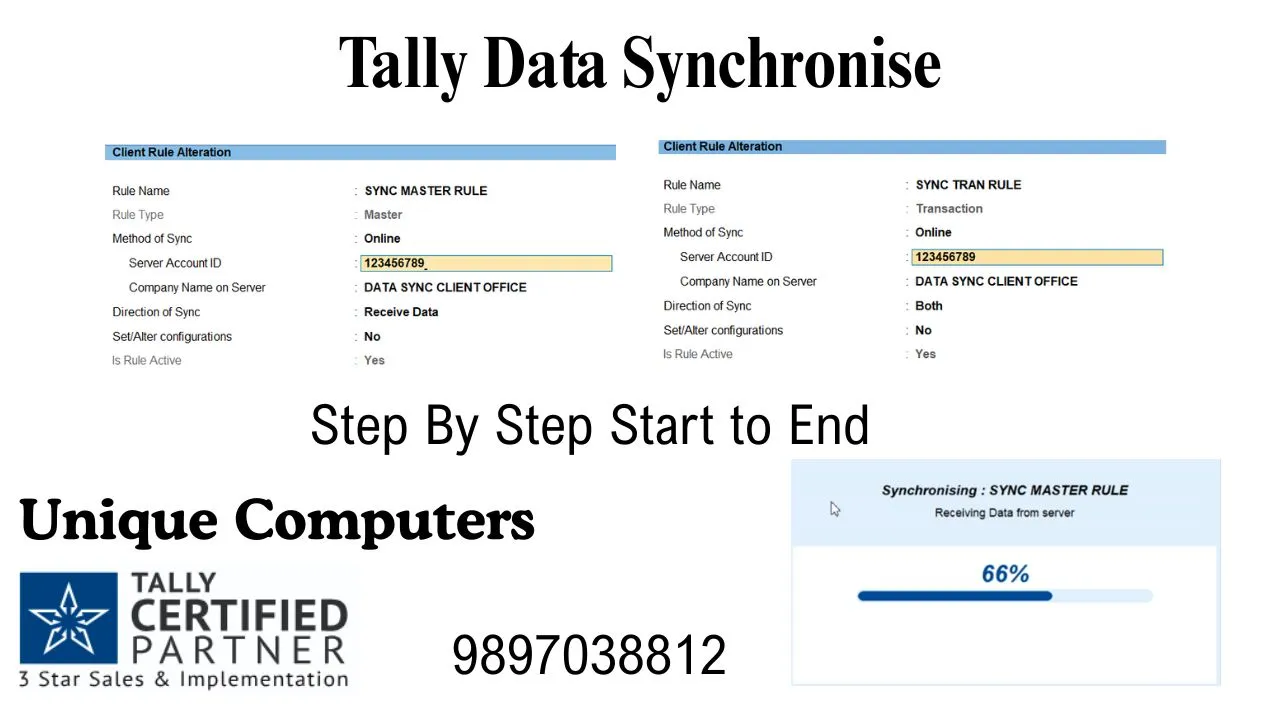
Tally Synchronise: Effortlessly Unify Your Business Data Across Locations
In today’s fast-paced, multi-location business environment, fragmented data is a silent profit killer. Consequently, the need for real-time, accurate financial information is paramount. Fortunately, Tally Synchronise emerges as a revolutionary solution, a robust data synchronization feature embedded within TallyPrime. This powerful tool, expertly implemented by Unique Computers Roorkee, empowers businesses to seamlessly connect their headquarters with branches, warehouses, and retail outlets. Ultimately, it creates a unified, real-time view of your entire financial ecosystem. This comprehensive guide will demystify Tally Synchronise, exploring its profound benefits, easy access protocols, and the critical technical components like the Tally Account ID, Master & Transaction Rules, and the crucial F11 function for remote access.
What is Tally Synchronise? A Simple Yet Powerful Explanation
Tally Synchronise is, in essence, the digital lifeline for distributed businesses. Imagine your main office in Roorkee and a sales branch in Dehradun working on the same company data, simultaneously, without conflict. Tally Synchronise makes this possible. It is an ingenious feature that allows two or more Tally installations to exchange and update data automatically over an internet connection. Therefore, sales invoices raised in Dehradun appear instantly in Roorkee’s books, and inventory updates from the warehouse are reflected in real-time at all points. This eradicates delays, manual consolidation errors, and provides a single source of truth. For businesses partnering with Unique Computers Roorkee, setting up this synchronization is a streamlined, hassle-free process, ensuring data integrity from day one.
The Staggering Benefits of Using Tally Synchronise
Implementing Tally Synchronise transforms business operations. The benefits are tangible and immediate.
- Real-Time Data Consolidation: Eliminate the agonizing wait for month-end reports. Achieve instant consolidation of data from all locations, enabling proactive decision-making.
- Enhanced Accuracy & Reduced Errors: By removing manual data entry and transfer between locations, you dramatically slash the risk of human error, ensuring your financial data is pristine and reliable.
- Superior Operational Efficiency: Automate data flow. Your staff saves countless hours otherwise spent on compiling spreadsheets and sending emails, allowing them to focus on core business activities.
- Improved Cash Flow Management: Instantly view outstanding receivables and payables across all branches. This visibility is crucial for effective cash flow forecasting and management.
- Centralized Control with Local Flexibility: Head office retains control over masters (like ledgers, stock items) and critical policies, while local branches enjoy the freedom to record their day-to-day transactions. It’s the perfect balance.
- Scalability for Growth: As you add new locations, simply integrate them into your existing Tally Synchronise framework. The system scales effortlessly with your ambition.
Tally Synchronise Achieving Easy Access Across Multiple Locations
Gone are the days of complex VPNs and expensive leased lines. Tally Synchronise offers remarkably easy access. The setup involves designating one Tally instance as the Server (typically at Head Office) and others as Clients (branches). Once configured with the correct Tally Account ID and rules, the client systems connect to the server via the internet. Authorized users at any location can then access, input, and view synchronized data based on the permissions set. Unique Computers Roorkee specializes in designing this architecture tailored to your business flow, ensuring access is both easy for users and secure for your data.
Tally Synchronise The Critical Components: Demystifying the Technical Core
To truly harness Tally Synchronise, understanding its core components is essential.
1. What is the Tally Account ID?
The Tally Account ID is the unique digital identity for your TallyPrime license. Think of it as your Tally’s passport number. It is crucial for activating and using Tally’s online features, including Tally Synchronise. You need a valid Tally Account ID linked to your software to establish the trusted connection between server and client systems. Without it, synchronization cannot be initiated.
2. What are Master Rules and Transaction Rules for Tally Synchronise?
These rules are the governance center of Tally Synchronise, controlling what data moves and how.
- Master Rules: These dictate the synchronization of your foundational data—Ledgers, Stock Items, Units of Measure, Godowns, etc. You can set rules like “All Masters are created only at the Head Office” or allow specific branches to create masters for their use. This prevents duplication and maintains standardization.
- Transaction Rules: These govern the flow of daily business entries—Vouchers (sales, purchases, receipts, payments). Rules can be set to push transactions from branch to head office, pull relevant data from head office to branch, or both. For instance, a sales voucher created at a branch can be configured to synchronize immediately to the head office server.
Configuring these rules correctly is vital for a clean data flow. The experts at Unique Computers Roorkee ensure these rules align perfectly with your organizational hierarchy and processes.
3. What is Online Access in Tally?
Online Access is the gateway that enables Tally Synchronise. It refers to the ability of your Tally software to communicate over the internet using your Tally Account ID. Enabling online access is the first step in the synchronization setup. It authenticates your software and allows it to act as a server (to receive data) or a client (to send data).
4. The Pivotal F11 Function: Enabling “Yes” to Remote Access
This is the most practical step in the process. The F11 key in Tally opens the “Company Features” menu. Here lies a critical setting:
- Press F11 on the company you wish to synchronize.
- Go to the Advanced Configuration options.
- Look for the setting labeled “Remote Access” or similar (wording may vary slightly by TallyPrime version).
- Set this to “Yes”.
By setting this to Yes, you are essentially opening a controlled port for your Tally instance to accept synchronization requests from other authorized Tally clients. It is the final technical switch that brings the entire Tally Synchronise framework to life. Unique Computers Roorkee strongly advises ensuring proper security measures, like strong Tally security controls and firewall settings, when enabling this feature.
Frequently Asked Questions (FAQ)
Q1: Is a high-speed internet connection mandatory for Tally Synchronise?
A: A stable internet connection is required, but it doesn’t need to be extremely high-bandwidth. Since Tally syncs only raw data packets (not the entire software), even reliable broadband connections work efficiently.
Q2: Can I synchronize data with a branch that has intermittent internet?
A: Yes. Tally is designed for resilience. If a branch goes offline, it continues recording transactions locally. Once the connection is restored, Tally Synchronise automatically transfers the pending data to the server, ensuring no information is lost.
Q3: Is my data secure during synchronization?
A: Absolutely. Tally uses secure data encryption protocols during transmission. Furthermore, access is strictly controlled through Tally security levels (set via User Roles) and the Tally Account ID authentication.
Q4: Can we implement Tally Synchronise ourselves, or do we need help?
A: While the steps are documented, the strategic setup of Master and Transaction Rules is where expertise matters. Incorrect rules can lead to data chaos. Partnering with an authorized provider like Unique Computers Roorkee guarantees an optimal, error-free setup tailored to your business.
Q5: What support does Unique Computers Roorkee offer for Tally Synchronise?
A: We provide end-to-end services: requirement analysis, architecture design, software configuration, rule setup, testing, staff training, and ongoing technical support to ensure your multi-location sync runs flawlessly.
Conclusion: Synchronise Your Success Story
Ultimately, Tally Synchronise is not just a feature; it’s a strategic advantage. It dismantles geographical barriers, unifies your business vision, and provides the real-time intelligence needed to thrive in a competitive market. From understanding the pivotal Tally Account ID and configuring precise Master & Transaction Rules to enabling Online Access and the crucial F11 function, each element builds towards seamless operational harmony.
Don’t let distance dictate your data’s destiny. Unlock the full potential of your multi-location business.
Contact Unique Computers Roorkee today to implement a robust, secure, and efficient Tally Synchronise solution.
Email: muneshrke@gmail.com | Website: https://hardwaresoftware.in