
The Ultimate Comprehensive Guide to TallyPrime 7.1 Benefits and Features
TallyPrime 7.1 Benefits, Running a successful business requires complete control over your daily financial operations. In the modern commercial market, manual bookkeeping processes are no longer sufficient. Relying solely on manual entry causes unwanted data entry errors, delayed reports, and unexpected compliance misses. As an ambitious business owner, you cannot afford these setbacks when scaling your operations.
Moving your daily accounting from legacy platforms like Tally.ERP 9 to the modern TallyPrime ecosystem is the most reliable way to upgrade your business. The platform has received massive structural updates over the years, culminating in the latest 7.x series.
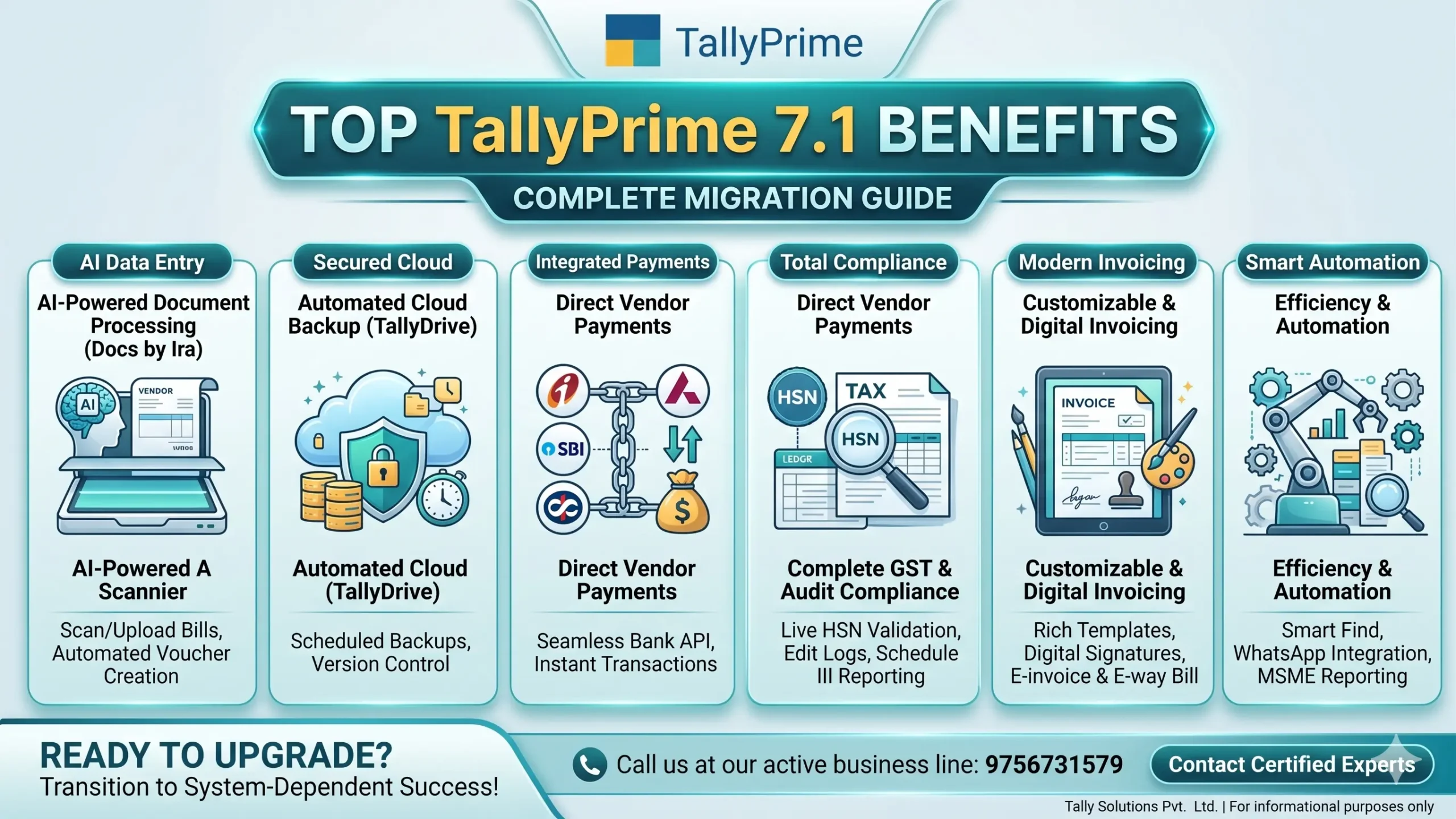
In this exhaustive blueprint, we will thoroughly explore all the core TallyPrime 7.1 benefits from the “WhatsApp Image 2026-06-27 at 8.48.00 PM.jpeg” file. We will analyze how these updates directly solve everyday business pain points, automate tedious manual entry work, and give you real-time visibility into your cash flow.
Top TallyPrime 7.1 Benefits You Need to Know
The latest release represents a massive milestone in the history of business management software. It shifts the user experience from basic digital ledger recording to intelligent, system-driven process automation. If you want your business to be system-dependent rather than people-dependent, these features provide the exact foundation you need.
Below is an in-depth breakdown of the most critical, revolutionary TallyPrime 7.1 benefits designed to modernize your back-office systems.
🤖 AI-Powered Document Processing with Docs by Ira
Manual data entry is one of the biggest bottlenecks in any finance department. Staff members often spend hours typing data from paper purchase invoices, expense receipts, and vendor bills. This slow process delays your financial reporting and introduces errors.
One of the most impressive TallyPrime 7.1 benefits is the introduction of Docs by Ira, an integrated AI-powered document processing engine. With this feature, your team no longer needs to manually punch in line-by-line item details.
- You can scan or upload physical or digital vendor invoices directly into the system.
- The built-in artificial intelligence automatically reads the text, identifies the supplier name, parses item descriptions, calculates tax rates, and extracts totals.
- It then creates complete, accounting-ready voucher drafts inside your ledger. Your team simply reviews the automated entry and presses save. This single feature can slash invoice processing times by up to 80%.
🎨 Fully Customizable Invoice Templates
Your sales invoice is often the most frequent point of contact your clients have with your brand. A generic, unformatted bill does not reflect the professionalism of a modern, fast-growing enterprise.
Enhanced invoice template customization stands out as a highly requested feature among the TallyPrime 7.1 benefits. Businesses are no longer restricted to rigid, default billing formats.
- The system provides beautifully designed, ready-to-use invoice templates right out of the box.
- You can completely personalize these templates using an intuitive, visual setup. You can add corporate logos, modify color schemes to match your branding, apply custom fonts, and embed secure digital watermarks.
- This ensures that every invoice sent to your clients looks clean, authoritative, and perfectly formatted.
☁️ Automated Cloud Backup via TallyDrive
Data loss is a severe threat to any business. Hard drive crashes, local server corruption, accidental formatting, and malware attacks can erase years of financial history in seconds. Taking manual backups onto external flash drives or local hard disks is hard to track and often forgotten by busy staff.
With the latest TallyPrime 7.1 benefits, data security becomes completely automatic. The software includes TallyDrive, a dedicated cloud storage space built specifically for secure financial data management.
- The system runs automated, scheduled backups directly to the cloud in the background without slowing down your computer.
- It includes complete version control, allowing you to view and restore previous versions of your data if an emergency occurs.
- This enterprise-grade cloud security ensures your accounting records remain completely safe, private, and retrievable at any time.
💳 Direct Vendor Payments via ICICI, Axis, SBI, and Kotak
In traditional accounting setups, executing payments to suppliers is a tedious, multi-step chore. An accountant must calculate outstanding amounts in Tally, copy the figures, open a separate net banking portal, log in, manually add beneficiary details, type the amount, and wait for an OTP. Once the payment goes through, they must return to Tally to manually create a payment voucher.
The modern banking integrations included in the TallyPrime 7.1 benefits completely eliminate this fragmented workflow. The software connects securely with top-tier banking institutions through dedicated APIs.
- It features a direct integration with ICICI Bank, alongside Axis Bank, SBI, and Kotak Bank.
- Your accounting team can select outstanding bills and clear payments directly from the transaction screen.
- The software pushes the payment instructions to your bank via a secure channel, triggers the authorization workflow, and automatically logs the corresponding payment entry. This keeps your bank book perfectly synchronized in real-time.
🔍 Global Instant Search with Smart Find
As a company grows, its database expands to hold thousands of distinct ledgers, items, stock groups, and cost centers. When an accountant is working inside a voucher and needs to verify a specific detail, they often have to cancel their current work, navigate back to the main menu, open a separate report, find the detail, and restart the voucher entry.
The introduction of Smart Find addresses this exact friction point. It acts as an intelligent, global search engine available on every single screen.
- With a quick shortcut, you can call up a universal search bar.
- You can type a voucher number, an amount, a partner’s name, or a specific item description.
- The system instantly pulls up the requested records without closing or disrupting your active workspace. This keeps your data entry staff focused and fast.
Step-by-Step TallyPrime 7.1 Benefits by Category
To truly appreciate the value of upgrading, it helps to view these features through organized categories. The development of the TallyPrime series has addressed crucial areas of business management: compliance, banking, invoicing, reporting, and core automation.
Let’s dive deep into the specific TallyPrime 7.1 benefits across these five core categories as highlighted in the “WhatsApp Image 2026-06-27 at 8.48.00 PM.jpeg” file.
TallyPrime 7.1 Benefits for Compliance & Audit
Tax compliance laws change constantly. Missing a tax deadline or filing an inaccurate return can result in steep penalties, audit notices, and strained relationships with your tax consultant. TallyPrime acts as an automated compliance assistant that keeps your records correct from day one.
Real-Time Online HSN Validation
Filing GST returns requires highly accurate HSN and SAC codes for every item sold. Typing an invalid or outdated code can cause your GST return to be rejected.
- With the compliance updates in the TallyPrime 7.1 benefits, you can validate HSN/SAC codes directly against the live government portal with a single click.
- The system highlights any mismatch or invalid code instantly. This lets you fix errors before saving the entry, saving you from stressful corrections at the end of the month.
Comprehensive Schedule III Reporting
Preparing final financial statements like Balance Sheets and Profit & Loss accounts for corporate filings can be a complex task. Accountants often spend days exporting data to spreadsheets to format everything according to corporate laws.
- TallyPrime simplifies this completely by generating native, structured financial statements fully compliant with Schedule III requirements.
- Your balance sheets, asset schedules, and liability reports are automatically grouped into the exact formats required by corporate regulators. This saves your internal team and external auditors hours of manual formatting work.
Robust Edit Log Audit Trails
Internal data security is vital when managing an office team. Business owners need to know if an employee modifies or deletes a historical voucher after it has been approved.
- The integrated Edit Log feature creates a permanent, unalterable trail of every single modification made within your company files.
- It tracks which user modified an entry, logs the exact date and time of the change, and shows a clear comparison of the old data versus the new data.
- This completely eliminates internal data manipulation, guarantees data integrity, and makes year-end audits stress-free.
Multi GSTIN Support within One File
Many expanding businesses operate branches or warehouses across multiple states. Legally, each state branch requires a distinct GST registration number. In older software setups, you had to create completely separate company data files for each state registration, making it very difficult to see your total company performance.
- One of the most impactful operational updates is native Multi GSTIN management.
- You can track transactions for all your state branches inside one single unified company file.
- The system keeps the tax ledgers separate and lets you generate clean, state-specific GSTR-1 and GSTR-3B reports without any messy manual data merging.
Integrated Invoice Management System (IMS) and Real-Time Tracking
Under the modern GST framework, claiming Input Tax Credit (ITC) depends directly on whether your suppliers file their returns correctly and on time. If a vendor forgets to upload your purchase invoice to the GST portal, your ITC is put at risk, which can harm your business cash flow.
- The Real-time IMS and Live Status of GST ITC at Risk tools solve this issue completely.
- The software connects directly with the GST network to track the exact filing status of all your vendors.
- It alerts you immediately if a vendor has failed to file their returns, labeling that specific ITC as “at risk.”
- This allows you to follow up with the vendor immediately to secure your tax credit before making your final supplier payments.
TallyPrime 7.1 Benefits for Banking & Payments
A healthy cash flow is the engine of any business. If your banking entries are messy, you cannot make accurate financial decisions. TallyPrime connects your accounting directly to the banking network to save you time and hassle.
+----------------------------------------------------------------------------------------+
|                      THE TRADITIONAL VS. MODERN TALLY BANKING WORKFLOW                 |
+----------------------------------------------------------------------------------------+
|                                                                                        |
|  OLD WAY:   [Tally Outstanding] -> (Copy Data) -> [Bank Portal] -> (Manual Transfer)   |
|                                                                 |                      |
|                                                                 v                      |
|             [Manual Voucher Entry] <- (Wait for Statement) <- [Confirm Payment]        |
|                                                                                        |
|----------------------------------------------------------------------------------------|
|                                                                                        |
|  NEW WAY:   [Tally Transaction Screen] ---> Direct API Payment Integration             |
|  (7.x)                                 |                                               |
|                                        v                                               |
|                             Auto Voucher Created + Real-Time Live Balance              |
|                                                                                        |
+----------------------------------------------------------------------------------------+
API-Driven Statement Imports and Automated Voucher Creation
In older setups, reconciling a bank statement meant printing out pages of bank transactions and manually checking off entries one by one against the Tally ledger. This process is slow, tedious, and prone to oversight.
- The banking modules included in the TallyPrime 7.1 benefits introduce direct API-based bank statement fetching.
- You no longer need to manually download Excel files from your bank portal. The software securely pulls your statement details directly from your bank.
- Even better, the system reads the narration in your bank statement and automatically generates the matching payment or receipt vouchers.
- It matches customer payments to outstanding bills based on amounts and names, reducing bank reconciliation from a full day’s chore to a few quick clicks.
Live On-Screen Bank Balances
When entering a quick payment voucher or issuing a check to a vendor, an accountant needs to know if there are enough funds in the bank account. Checking this usually requires pausing work, logging into a bank portal, and checking the balance.
- With TallyPrime, you can view your Live Bank Balance directly on your main transaction screen for Axis, SBI, Kotak, and ICICI bank accounts.
- The software displays your actual bank balance right alongside your ledger balance. This gives you instant visibility and helps you manage your day-to-day cash flow with complete confidence.
Quick Payment Links and QR Codes on Invoices
Delayed payments from customers can stall business growth. The harder it is for a customer to pay your invoice, the longer they will delay the payment.
- You can print dynamic Payment Links and QR codes directly onto your sales invoices.
- When you generate an invoice, the software creates a secure payment link and a custom UPI QR code for that exact invoice amount.
- When your customer receives the invoice via email or WhatsApp, they can scan the QR code with any smartphone app to pay you instantly. This feature shortens your collection cycle and keeps your cash flowing smoothly.
TallyPrime 7.1 Benefits for Invoicing
Your sales invoices are key to keeping your revenue flowing. TallyPrime ensures your billing system is fast, customizable, and always aligned with the latest regulatory guidelines.
Single-Click E-Invoicing and E-Way Bill Generation
For businesses that fall under mandatory e-invoicing limits, generating bills can be a complicated task. In legacy systems, you had to create a normal bill, export it as a JSON file, log into the government portal, upload the file, copy the IRN and Ack details, and paste them back into your software.
- TallyPrime turns this multi-step chore into a simple, single-click action.
- The software connects directly with the government’s e-invoice and e-way bill portals.
- As soon as you save a sales entry, the system sends the data, fetches the unique IRN and QR code, and prints them onto your invoice automatically within seconds. Your staff never has to leave the software.
Legally Secure Digital Signatures
In an increasingly digital business world, mailing paper invoices with ink signatures is slow and inefficient. However, sending standard PDF invoices without any verification can raise security and trust concerns with corporate clients.
- TallyPrime includes built-in support for Digital Signatures (DSC).
- When you export or email an invoice as a PDF, the software applies your secure digital signature token automatically.
- This guarantees that the document is authentic and has not been altered, providing full legal compliance and peace of mind for both you and your clients.
Smart Bill Sorting for Outstanding Payables
When reviewing long statements of outstanding bills, finding specific past-due payments can be tough. Standard ledger reports often show a long, unorganized list of historical entries.
- The Enhanced Bill Sorting feature lets you organize your outstanding bills using multiple criteria.
- You can instantly sort open invoices by due date, bill amount, state branch, or vendor type.
- This helps your collection team focus on high-priority collections first, turning outstanding balances back into working capital quickly.
TallyPrime 7.1 Benefits for Reporting and Analytics
You cannot manage what you do not measure. TallyPrime transforms raw transactions into clear, actionable reports that help you steer your business in the right direction.
+----------------------------------------------------------------------------------------+
|                              THE CENTRALIZED BUSINESS DASHBOARD                        |
+----------------------------------------------------------------------------------------+
|                                                                                        |
|  [ SALES PERFORMANCE ]   --> Track your monthly sales growth trends.                   |
|  [ CASH FLOW ANALYSIS ]  --> Monitor your real-time bank and cash positions.           |
|  [ RECEIVABLES MONITOR ] --> View aging schedules for outstanding payments.            |
|  [ PROFITABILITY RATIOS] --> Review your gross and net margins instantly.              |
|                                                                                        |
+----------------------------------------------------------------------------------------+
The Centralized Business Dashboard
Reviewing a high-level summary of your business performance usually requires opening multiple distinct accounting reports, which can make it hard to spot overall trends.
- The Business Dashboard provides a clear, high-level overview of your entire financial health on a single screen.
- It displays real-time, visual graphs of your key performance indicators, including sales trends, purchase histories, current cash flow, and accounts receivable aging schedules.
- This dashboard acts as a command center, giving you the real-time insights you need to make quick, confident management decisions.
Granular Data Control with Advanced Report Filters
Standard accounting reports can be overwhelming when you are looking for a specific subset of data, such as finding a transaction from a specific city or within a unique amount range.
- The Report Filter engine allows you to search and filter data across your entire reporting system.
- You can apply filters based on any field, such as text fragments, specific value ranges, or unique date combinations.
- The system sifts through thousands of records instantly to show you the exact data you need. This saves you from tedious manual sorting and data clean-up.
TallyPrime 7.1 Benefits for Automation & Connectivity
True operational efficiency comes from connecting your accounting systems directly with your customers, vendors, and external datasets. TallyPrime removes data silos to help your business move faster.
Seamless Excel Data Imports
Transitioning data from other business tools, e-commerce platforms, or custom point-of-sale systems into your accounting software often requires tedious manual entry.
- The Excel Import to Tally tool maps and imports data directly from standard Excel spreadsheets into your company ledger.
- Whether you are importing a long list of new inventory items, a month of bank transactions, or bulk sales entries from an online store, you can map the columns and import everything in seconds. This eliminates manual data entry bottlenecks completely.
Direct WhatsApp Integration
When a client asks for a copy of their ledger statement or an outstanding invoice, your staff usually has to export the file, save it to their computer, open an email client, attach the file, and send it. By the time the client receives it, the payment conversation may have cooled down.
- TallyPrime bridges this gap with built-in WhatsApp for Business integration.
- You can securely send invoices, payment reminders, and ledger statements to your clients’ WhatsApp numbers directly from the report screen.
- Your customers receive their bills instantly on their preferred messaging app, making communication fast and speeding up your payment collections.
Detailed Release-by-Release Analysis of TallyPrime 7.1 Benefits
The power of the modern TallyPrime platform is built on continuous, version-by-version improvement. Every major update has introduced important tools designed to address common business challenges. When you upgrade to version 7.1, you gain immediate access to all the features developed across the history of the platform.
The table below breaks down the timeline of features from the “WhatsApp Image 2026-06-27 at 8.48.00 PM.jpeg” file, showing how each release contributes to the overall TallyPrime 7.1 benefits.
| TallyPrime Release Version | Core Features Added | Core Business Value & Impact |
| TE9 to TP 7.x (Cumulative) | Docs by Ira, Auto Backup, Connected GST, Automatic Ledger, Prime Banking, Smart Find, E-invoice, Payment Links. | Provides a complete paths to full automation, cloud data safety, and single-click compliance. |
| TallyPrime 2.x | E-invoice & E-way Bill, Edit Log, Report Filter, Digital Signature, TRiB, TP Cloud Access. | Introduced direct portal connectivity, reliable internal audit logs, and secure remote data access. |
| TallyPrime 3.x | Multi GSTIN, Simplified GST Configuration, Payment Link & QR Code. | Enabled easy multi-branch management and helped businesses collect payments faster. |
| TallyPrime 4.x | Excel Import to Tally, TP with WhatsApp, Business Dashboard, MSME Reports. | Opened up bulk data importing, instant client messaging, and high-level financial dashboards. |
| TallyPrime 5.x | Automatic Ledger Creation, GSTR1 Filing & Recon, Live Status of GST ITC at Risk, Validate GSTIN & Party Status, Enhanced Bill Sorting. | Automated routine ledger tasks and protected input tax credits with live vendor validation. |
| TallyPrime 6.x | Check Live Bank Balance, Get Bank Statement via API, Voucher Creation from Statements, Edit Log Report, MSME Form-1, HSN Summary for B2B/B2C, Real-time IMS, FS for NCEs. | Delivered direct banking connections, automated reconciliation, and deep compliance tools. |
| TallyPrime 7.x (Latest) | AI-powered document processing (Docs by Ira), Invoice Template Customization, HSN Validation & Schedule III, Auto Backup in TallyDrive, Direct Vendor Payments (including ICICI), Smart Find. | Delivers cutting-edge AI data entry, complete cloud backup security, and custom, professional billing. |
Shifting from People-Dependent to System-Dependent Operations
Many businesses hit a growth ceiling because their day-to-day work depends entirely on specific employees. If a senior accountant takes a sick day or leaves the company, operations can grind to a halt. Invoices don’t get sent, payments stall, and compliance deadlines get missed.
Embracing the TallyPrime 7.1 benefits is an effective way to transition your business into a system-dependent model.
- By automating your data entry with Docs by Ira, you ensure your workflows stay fast and consistent, regardless of staff changes.
- Using TallyDrive for automated cloud backups removes the risk of human forgetfulness.
- Features like Smart Find, API-driven bank statements, and automated ledger creation mean that even newer team members can handle daily accounting tasks accurately and efficiently.
This software setup gives you peace of mind as a business owner. It allows you to step away from micro-managing daily paperwork and focus your time where it matters most: scaling your operations and growing your business.
Frequently Asked Questions About TallyPrime 7.1 Benefits
Q1: What are the main TallyPrime 7.1 benefits compared to older Tally versions?
The latest version introduces advanced automation features like AI-powered document entry via Docs by Ira, automated cloud backups with TallyDrive, direct payment processing with ICICI Bank, and fully customizable invoice templates. These features move your accounting from manual entry to automated business management.
Q2: How does the AI feature “Docs by Ira” save time?
Docs by Ira automatically reads scanned or digital vendor invoices and drafts the accounting entries for you. This removes the need for your team to type in line-by-line item details, which reduces human error and speeds up invoice processing times.
Q3: Is my financial data safe with the automatic backup feature?
Yes, your data is highly secure. The built-in TallyDrive integration backs up your data to the cloud automatically in the background. It features full version control, letting you restore previous data versions easily if your local computer fails or experiences a drive crash.
Q4: Can I manage multiple branch offices inside a single TallyPrime file?
Yes. Thanks to native Multi GSTIN support, you can manage different state branches and their respective GST numbers inside one unified company file. This keeps your records organized and lets you view total company performance clearly.
Q5: What banks are supported for direct vendor payments?
The software supports direct API-driven payment processing for Axis Bank, SBI, Kotak Bank, and ICICI Bank. This allows you to pay your vendors securely directly from your transaction screen without opening a separate net banking portal.
Q6: How does the Invoice Management System (IMS) protect my Input Tax Credit?
The live IMS tool connects directly with the GST network to track your vendors’ filing status. It alerts you immediately if a supplier has missed their return filing deadline, letting you address the issue before your tax credit is impacted.
Q7: Can I send invoices and outstanding reports directly to my clients?
Yes. With the built-in WhatsApp for Business integration, you can securely send sales invoices, payment reminders, and customer ledger statements to your clients’ mobile numbers right from your reporting screen.
Q8: Do I need separate software to generate E-Invoices and E-Way bills?
No. The software connects directly with the government portals. You can generate compliant e-invoices and e-way bills with a single click right as you save your sales transactions.
Q9: What is the benefit of the Schedule III reporting update?
It automatically formats your Balance Sheets and Profit & Loss statements to align perfectly with corporate disclosure laws. This removes the need for manual spreadsheet editing and makes your year-end audits much smoother.
Q10: How can I migrate my business data to the latest release safely?
While the software makes data migration straightforward, working with a certified partner ensures your data remains secure and your custom modules transfer correctly. A professional team can help you configure your system and train your staff to maximize the value of your upgrade.
Upgrade Today and Unlock the Full Power of TallyPrime 7.1 Benefits
Upgrading your business management systems is a vital step toward long-term operational success. Moving to the latest release helps you eliminate manual data bottlenecks, secure your financial records in the cloud, and stay ahead of changing compliance laws.
Our certified expert team based in Roorkee is here to make your transition smooth, secure, and stress-free. We provide complete software implementation, custom invoice design, team training, and reliable hardware support tailored to your unique business goals.
Ready to modernize your accounting systems? Let’s connect today!
📞 Call our official business hotline now: 9756731579